




ETZIN Wireless Hdmi Transmitter 4 Receiver Kit 50m 1080p for Tv Projector
Brand: ETZIN
Product Summary: ETZIN Wireless Hdmi Transmitter 4 Receiver Kit 50m 1080p for Tv Projector is currently listed on Amazon India at a deal price of ₹14,034. This is a genuine discount of 64.91% compared to its list price of ₹39,999.
Current Configuration:
Available Size:
View on AmazonProduct prices and availability are accurate as of September 14, 2026 07:24 AM IST and are subject to change. Any price and availability information displayed on Amazon.in at the time of purchase will apply to the purchase of this product.
As an Amazon Associate, we earn from qualifying purchases. This helps support our site's server maintenance costs.
Product Details & Specifications
- Primary Product ASIN B0DYJC8CR1
- Category Tree Path Electronics > Home Audio > Media Streaming Devices > Wireless Audio Receivers & Adapters
- Fulfilled & Sold By ETZIN PRIVATE LIMITED
- Product Features 1 Transmitter to 4 Receivers / 2.4G and 5G Dual Band / Low 0.1s Latency / Factory Paired / Plug and Play / Full HD 1080p / Phone and Tablet Screens via App
- Enclosure Material Polycarbonate (PC)
- Supported Media Type wifi
- Includes Remote No
- Installation Type wireless
- Rechargeable Battery Included No
- Compatible Devices Laptop, Desktop PC, Television, Monitor, Projector, Camera, Camcorder, Set Top Box, DVD Player, Gaming Console, Smartphone, Tablet
- Supported Standards 2.4_ghz_radio_frequency, 5_ghz_radio_frequency
- Compatibility Options Television, Personal Computer, Smartphone
- Supported Application Spotify, YouTube, General Audio Applications
- Hardware Interface 802.11 ac/b/g/n
- Connector Type Used on Cable HDMI
- Control Method App
- Audio Output Type HDMI
- Audio Output Mode Stereo
- Number of Channels 5
- Connectivity Technology HDMI
- Wireless Compability 2.4 GHz Radio Frequency, 5 GHz Radio Frequency
- Bluetooth support? No
- Item Dimensions L x W x H 6L x 10W x 4H Centimeters
- Item Weight Unit of Measure 200 Grams
- Brand Name ETZIN
- Model Name EPL-1436H
- Unit Count 1 Set
- Manufacturer ETZIN PVT LTD
- Importer Contact Information Helpline: +91-22-49696922
- Item Type Name Wireless HDMI Extender Kit
- Packer Contact Information ETZIN PVT LTD | Mumbai, India | Helpline: +91-22-49696922
- Best Sellers Rank #29,818 in Electronics (See Top 100 in Electronics) #60 in Wireless Audio Receivers & Adapters
- ASIN B0DYJC8CR1
- Customer Reviews 3.9 3.9 out of 5 stars (10) 3.9 out of 5 stars
About this item
- ONE TRANSMITTER SENDS TO FOUR SCREENS AT THE SAME TIME — Connect the transmitter to your laptop, camera, set-top box or gaming console, and place the four receivers on four different TVs, monitors or projectors. All four screens show the same picture and sound together. There is no cable running across the room, and nothing has to be switched between screens.
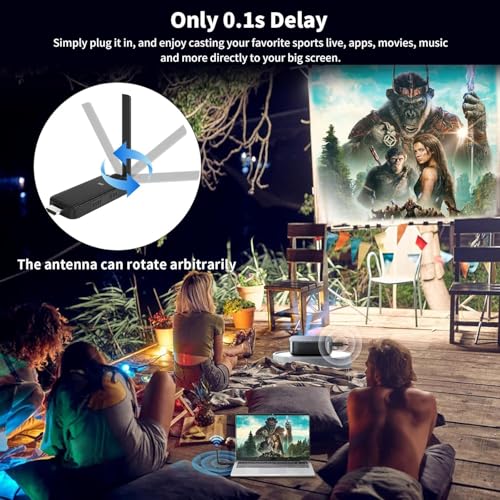
- PLUG AND PLAY. NO APP, NO WI-FI, NO BLUETOOTH — The transmitter and the four receivers are already paired in the factory. Connect them to your devices, wait about 5 seconds, and your screen appears. Nothing has to be installed. Please check the marking before connecting: TX goes to the source such as your laptop or camera, and RX goes to the display. Also open out the antenna on the transmitter and on every receiver, because a folded antenna badly reduces the range.
- UP TO 165FT / 50M RANGE ON 2.4G AND 5G DUAL BAND — The kit uses both 2.4GHz and 5GHz bands, so the signal stays stable and latency is only about 0.1 second. This makes it suitable for a conference room, a classroom, a sports bar during a match, a church or wedding hall, a gym, or watching a film on TVs in different rooms of the house.
- USE YOUR PHONE OR TABLET AS AN EXTRA SCREEN — Install the free TuTuPlay app on an Android phone or tablet, or on an iOS device, and it becomes one more display for the same source. You can mix fixed screens and mobile screens as you need, for example 2 TVs with 4 phones, or 4 TVs with 2 phones. Please note that a touchscreen cannot control the source device in reverse.
- FULL HD 1080p PICTURE WITH SOUND — Video and audio travel together, so presentations, cricket and football matches, films, camera shots and games all reach every screen at the same time. Useful for a photographer who wants to see shots on a big screen at once, or a trainer who wants the class to follow the same video on several displays.
- WHAT YOU GET IN THE BOX — 1 transmitter, 4 receivers, 5 USB-C power cables, 4 HDMI extension cords and 1 user manual. The HDMI extension cords let you hang each receiver behind the TV instead of forcing the dongle straight into a tight HDMI socket. Please note that power adapters are not supplied, so use a USB 5V adapter of 1A or above, or a USB port on your TV, for every unit. Warranty is 6 months against manufacturing defects.
Product Description
Application Scenario Previous page Family This Ultra-Long-Range stable splitter can realize multi-TV multi-room sharing, the fun of movies is no longer limited to the living room, you can watch movies wherever you want. Exercise Fitness This multi-TV transmitter throws the small screen to the big screen, and you can follow the lessons, making the movement more standard and easy. Sports Bar This HDMI wireless dongle no cable, no software driver, no Bluetooth connection. During the World Cup, it will be a good choice for bars, where the fun of the game can be easily enjoyed in two steps Wedding/Church The HDMI wireless dongle for TV using 2.4GHz and 5GHz dual-band Wi-Fi,only ultra-low 0.1s latency.Suitable for places such as churches and weddings that require the installation of monitors. Live/Take Photos Use this HDMI wireless adapter to sync your shots, so you can view photos from your computer at any time, no need to view photos through the camera, more convenient. Next page Previous page Next page 1 Applicable Equipment 2 Procedure Of Use 3 Free Collocation 4 HOW TO CONTACT? Previous page Next page NOTE 1.How do use phone and iPad as screens: Download the " Tu Tu Play" application, search Wi Fi "Tu Tu Link XXXX", enter the password "12345678", and return to the "Tu Tu Play" application after the connection is completed. 2.The HDMI wireless transmitter and receiver utilize a 5V/2A power supply for stable connectivity. Power cables must be connected to both transmitter and receiver to ensure stable power supply, otherwise the device will be disconnected or unavailable. 3.Screen matching suggestions:2 fixed displays +4 mobile displays or 4 fixed displays +2 mobile displays. 4.The HDMI wireless receiver and transmitter surface is marked with TX and RX,TX (transmitter) is for Laptop, Camera, Cable Box and so on, while RX (receiver) is for display connection. Please be sure to distinguish the transmitter (TX) and receiver (RX) before hooking it up. 5.The long range HDMI wireless transmitter and receiver, delivering a 165FT/50M Long Transmission Range in Open Environments (No Barriers). With 5G Technology Support, it can transmit through walls or ceilings, covering about 32 FT (10 Meters). Troubleshooting Methods: 1.Re-pair:The HDMI wireless adapter has been paired before delivery. If the pairing fails due to improper operation or other reasons during use, re-pair the device. The steps are as follows: a. Long press the receiver(RX) function key for more than 3 seconds, a pairing prompt appears, and the receiver indicator quickly flashes into pairing mode. b. Long press the transmitter(TX) function key for more than 3 seconds, and the indicator flashes rapidly for pairing. Wait for the indicator to be steady on, indicating that the connection is successful. 2.Overheating: TX and RX devices emit heat during operation. This generated heat falls within controllable limits and is considered a typical occurrence. If overheating occurs, disconnect the device from HDMI, let it cool, then reconnect. 3.Unplug and Plug: Re-insert electronic devices if issues arise. Sometimes electronic devices may encounter problems that can be resolved by resetting the Unplug TX and RX for a while, then Plug Back again. 4.HDMI Interface Maintenance: Regular checks and reinsertion can resolve connection issues caused by prolonged use of the HDMI interface on devices such as TVs and laptops phone. 5.Unplug and Plug: Re-insert electronic devices if issues arise. Sometimes electronic devices may encounter problems that can be resolved by resetting the Unplug TX and RX for a while, then Plug Back again.
Recommended Deals
Loading recommendations...