
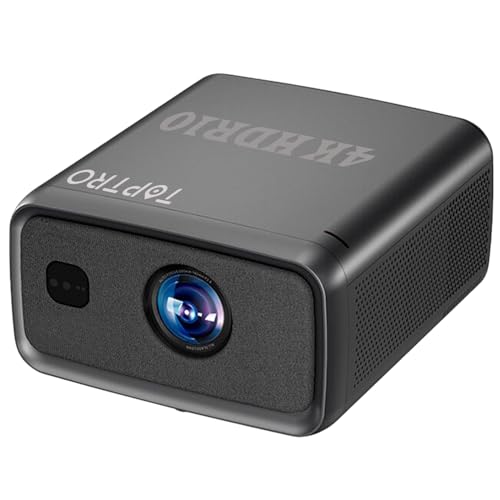


TOPTRO Legend Ultra Max Projector 4K Ultra HD, HDR10, 4000 ANSI Highest Brightness 45000 Lumens Day Light Use, MEMC, HDMI ARC, Octacore 4G 64G, Fully Sealed, TOF Auto Focus, YouTube HOT* Prime
Brand: TOPTRO
Product Summary: TOPTRO Legend Ultra Max Projector 4K Ultra HD, HDR10, 4000 ANSI Highest Brightness 45000 Lumens Day Light Use, MEMC, HDMI ARC, Octacore 4G 64G, Fully Sealed, TOF Auto Focus, YouTube HOT* Prime is currently listed on Amazon India at a deal price of ₹39,990. This is a genuine discount of 33.34% compared to its list price of ₹59,990.
Product prices and availability are accurate as of August 17, 2026 07:33 AM IST and are subject to change. Any price and availability information displayed on Amazon.in at the time of purchase will apply to the purchase of this product.
As an Amazon Associate, we earn from qualifying purchases. This helps support our site's server maintenance costs.
Product Details & Specifications
- Primary Product ASIN B0FJGBGXWV
- Category Tree Path Electronics > Home Theater, TV & Video > Projectors
- Fulfilled & Sold By MEGAA ELECTRONICS | AUN PROJECTORS
- Product Features 4K HDR10, MEMC Technology, Octacore Processor, Android 15.0, 4GB 64GB, Auto Focus & KeyStone, Native 1080p Full HD & True 4K Ultra HD Support, 4000 ANSI Ultra Bright 45000 Lumens Brightness, 30W Big Speakers, Builtin Apps & Install, Dual 5G & 2.4G WiFi 6, Bluetooth, WiFi Display, Electronic Focus & 6D Electronic correction
- Network Connectivity Technology 3.5mm Jack, Bluetooth, Ethernet, USB, Wi-Fi
- Native Resolution 1920 x 1080
- Maximum Display Resolution 3840 x 2160 Pixels
- Display Type LCD
- Form Factor Portable
- Mounting Type Ceiling Mount
- Lumens 45000 Lumen
- Colour Grey
- Wattage 200 Watts
- Controller Type Remote Control
- Compatible Devices Gaming Console, Laptop, Smartphone, Speaker, Television
- Contrast Ratio 22000:1
- Maximum Throw Distance 5 Metres
- Light Source Operating Life 50000 Hours
- Maximum Image Size 300 Inches
- Hardware Connectivity 3.5mm Audio, Bluetooth 5, Ethernet, HDMI, USB 2.0
- Control Method Remote
- Minimum Throw Distance 1 Metres
- Minimum Image Size 60 Inches
- Video Encoding H.265, H.264
- Projector Maximum White Brightness 4500 ANSI Lumens
- Picture Quality Enhancement Technology 4K HDR10 MEMC
- Brand Name TOPTRO
- Antenna Location Business, Education, Gaming, Home Cinema
- Box Contents Projector, Remote Control, Power Cable, User Manual
- Model Name Toptro Legend Ultra Max Projector
- Model Number Legend Ultra Max
- Number of Items 4
- Manufacturer TOPTRO, TOPTRO, TOPTRO Projectors India, toptro.in, Email: support@toptro.in or sreeprojectors@gmail.com, Whatsapp: 8341888860
- Unit Count 1 Count
- Country of Origin China
- Importer Contact Information TOPTRO, TOPTRO Projectors India, toptro.in, Email: support@toptro.in or sreeprojectors@gmail.com, Whatsapp: 8341888860
- Item Type Name Home Cinema Projector
- Manufacturer Contact Information TOPTRO, TOPTRO Projectors India, toptro.in, Email: support@toptro.in or sreeprojectors@gmail.com, Whatsapp: 8341888860
- Packer Contact Information TOPTRO, TOPTRO Projectors India, toptro.in, Email: support@toptro.in or sreeprojectors@gmail.com, Whatsapp: 8341888860
- Manufacturer Part Number X6
- Warranty Description 1 Year Warranty *Warranty Terms and Conditions : *1. 1 Year Warranty for manufacturing defects, technical defects and software defects . *2. No warranty for LCD panel and LCD panel Burns. Clean the dust filter for every 15 days (Every Projector needs good cool air for ventillation. Otherwise due to high temperatures inside projector may damage LCD panel) . *3. No warranty for Dust related issues inside projectors (Dust may block cool air flow. Cool air may cool the projector temperature. So please keep the projector safe from dust) . *4. No warranty for Damage from misuse of products like broken, burns, physicial damages . *5. No warranty for Repairs through 3rd parties . *6. All LCD Projectors plays Netflix, Amazon Prime Video in HD or below HD quality only. So please use a Fire Stick, Computer, or laptop . *7. Due to copyright protections, content from Netflix, Amazon Prime and some other similar providers CAN NOT be wirelessly mirrored to the projector. *8. Due to HDCP, Copyrighted videos such as Netflix, Amazon Prime Video and some other similar apps must be played through Fire Stick, Computer, or laptop. If there is no picture but only sound on when you play movies, you may palying copyrighted movies . 9. Please turn off Dolby Sound if there is no sound when play Copyrighted videos like Netflix . 10. Please contact us for support, toptro.in, Email: support@toptro.in or sreeprojectors@gmail.com & Whatsapp message: 8333031317 .
- Best Sellers Rank #82,862 in Electronics (See Top 100 in Electronics) #186 in Home Cinema Projectors
- ASIN B0FJGBGXWV
- Customer Reviews 4.2 4.2 out of 5 stars (38) 4.2 out of 5 stars
- Item Dimensions L x W x H 30L x 25W x 30H Centimeters
- Item Weight 6 Kilograms
About this item
- 🔥【4K HDR10 - MEMC】 Toptro Projector Play True 4K Resolution HDR10 Videos - Native 1080p Resolution , True 4K 60 FPS Support - Fully Sealed Optical Engine - 300 inch Max Screen size - LTPS + Cinemascopic Wide Screen LCD (16:9) TOPTRO Legend Ultra Max Projector
- 🔥【Highest Brightness Legend Ultra Max Projector】 Day Light use Toptro Projector - 4000 ANSI Lumens Ultra Bright Projector - 45000 Lumens LED Light Brightness - 22000:1 Contrast - 50000 Hours Lamp Life
- 🔥【Connectivity】 6th Gen Dual Band WiFi with 2.4 Ghz + 5 Ghz - Bluetooth 5.2 - HDMI CEC - HDMI ARC - 2 x USB - 3.5 mm Audio Out - Connect Your Laptop, Macbook, Blu-ray Player, TV Sticks, TV boxes, PS4, Pendrives, Hard disks, etc.
- 🔥【AI Fully Automatic】 Toptro Projector Supports Auto Focus - Auto Keystone - Auto Obstacle Avoidance - Auto Screen Fit - Digital Zoom In & Zoom Out - 4P+4D Digital Keystone
- 🔥【Android 15】 Indias 1st Android 15.0, 4GB RAM 64GB ROM with Preinstalled 4K YouTube, Prime, HOT*, etc | High Speed Octacore Core CPU + MALI GPU. Toptro projector supports Miracast Wireless Screen Mirroring
- 🔥【Sound】TOPTRO Projectors Supports HDMI ARC - Bluetooth 5.2 - 30 Watt Big speakers | Enjoy your favorite apps, shows, movies, games, and more all in one place
- 🔥【TOPTRO Legend Ultra Max Supports MEMC Technology】 (Motion Estimation, Motion Compensation) technology has been widely used in TVs and projectors for some time now. Makes videos smoother. Makes videos clearer. Original Frame Rate: 24 fps (frames per second) With MEMC: Interpolated 60 or 120 fps - Result: Smoother, clearer visuals
- 🔥【 TOPTRO Legend Ultra Max Fully Sealed Optical Engine Projector 】The entire light path, from the light source to the lens, is enclosed, creating a dust-free environment that prevents dust, dirt, and moisture from entering and degrading image quality, resulting in consistent brightness, better color accuracy, no black spots, and significantly reduced maintenance.
What's in the box?
- Projector, Remote Control, Power Cable, User Manual
Product Description
TOPTRO LEGEND ULTRA MAX 4GB RAM, 64GB 4K HDR 10 MEMC Tech AI Octacore Processor Fully 4K HDR10 True Support | Android 15 | 4GB RAM 64GB Memory | HDMI ARC | Auto Focus, Keystone | Highest Brightness 45000 Lumens 4000 ANSI Day Light Use | Native 1080p | Highest Contrast Ratio | Big 30W DSP Audio Speakers MEMC Technology | New Generation AI Chip Octacore Processor | HDMI 2.1 4K HDR 10 Video Proof Enable 4K, HDMI ARC and 4K HDR10 Proof Enable 4K: 1. Connect TV Stick to the HDMI Port, 2. Press the source button on the projector remote and Select HDMI, 3. Long Press Menu Button on the Projector Remote, 4. Open Advanced, then select HDMI EDID Version as 2.0. Enable HDMI ARC: 1. Connect TV Stick to the HDMI Port, 2. Press the source button on the projector remote and Select HDMI, 3. Long Press Menu Button on the Projector Remote, 4. Open HDMI CEC, 5. Enable HDMI ARC Note: Incase of any issues please WhatsApp us. The video showcases the product in use.The video guides you through product setup.The video compares multiple products.The video shows the product being unpacked. Legend Pro 4K HD10 Previous page Next page 1 Auto Focus 2 Auto Keystone 3 AI Obstacle Avoidance 4 300+ inch Screen A Real LEGEND From TOPTRO | Updated Ultra Bright 45000 Lumen Day Light Projector Brightest Mini LED Projector 2500 ISO /3500 CVIA USB*2, HDMI, AUX, RJ45 2.4+5G Support WI-FI 6 | Bluetooth New Generation AI Chip Octacore Processor Why TOPTRO Legend Ultra Max? ✔ Updated 4000 ANSI Lumens - Experience stunning visuals with TOPTRO Legend Ultra Max - 4000 ANSI Lumens of brightness illuminates every scene, even during the daytime in well-lit rooms. ✔ Intelligent Screen Alignment Feature ✔ Instant Auto focus and auto keystone correction ✔ Intelligent Obstacle Avoidance Feature ✔ Digital Zoom ✔ Bluetooth 5.0 Chip - Bluetooth Connectivity & BT Speaker Mode. Not just a projector, but also a powerful High-Fidelity speaker that will blow your mind with its amazing sound quality. ✔ HIFI Sound - 3 x 10W speakers | 4XNBR subwoofer | DSP AKM7735. ✔ Smart Android 15.0. 4GB RAM and 64GB Memory ✔ Full 4K Ultra HD Support: YouTube Play upto 4K videos. ✔ Supports HDR10 ✔ 22000:1 contrast for home theater level. ✔ Dual 2.4G/5G Wi-Fi 6 Connection ✔ Cast Your Content - Cast your content, apps, and games directly to Legend Ultra Max from your favorite device with seamless content streaming. Let the L80 projector become the ultimate entertainment ✔ 30000 Hours Long Lifespan - Offers an extended life of 30,000 hours lasting up to 20 years with 4 hours of daily use and low power consumption at only 33% of a TV. Android 15 | 2.4G/5G Wi-Fi | Bluetooth 5.2 | Mobile Screen Mirror Previous page Next page 1. Note: Please use firetv stick or any other Netflix Certified TV Stick to Support All OTT Apps 2. Firetv Stick Audio Solution: 1. Open Amazon firetv stick settings, 2. Open Audio Video settings 3. Open Audio 4. Open Surround 5. Disable Dolby digital and Dolby digital plus 6. Select and Enable PCM Previous page Next page 1 4K HDR10 2 Next Gen AI CHIP 3 MEMC TECHNOLOGY
Recommended Deals
Loading recommendations...