


UGREEN Displaylink Docking Station for macOS Windows System
Brand: UGREEN
Product Summary: UGREEN Displaylink Docking Station for macOS Windows System is currently listed on Amazon India at a deal price of ₹24,999. This is a genuine discount of 36.87% compared to its list price of ₹39,598.
Product prices and availability are accurate as of September 08, 2026 04:39 AM IST and are subject to change. Any price and availability information displayed on Amazon.in at the time of purchase will apply to the purchase of this product.
As an Amazon Associate, we earn from qualifying purchases. This helps support our site's server maintenance costs.
Product Details & Specifications
- Primary Product ASIN B0BLNCNCMZ
- Category Tree Path Computers & Accessories > Accessories & Peripherals > USB Hubs
- Fulfilled & Sold By UGREEN India
- Hardware Interface USB 3.2 Gen 2
- Compatible Devices Laptops
- Total USB Ports 4
- Number of Ports 9
- Total HDMI Port 2
- Wattage 100 Watts
- Item Dimensions L x W x H 15.3L x 2.3W x 7.6H Centimeters
- Item Weight Unit of Measure 510 Grams
- Colour Black
- Brand Name UGREEN
- Number of Items 1
- Global Trade Identification Number 06957303899128
- Unit Count 1.0 Count
- Item Highlight 4K@60hz, 10Gbps, 100W, Gigabit Ethernet Adapter, Revodok Pro 209 USB-C Dock 9-in-1
- Manufacturer UGREEN, Ugreen Group Limited
- Country of Origin China
- Importer Contact Information Nikita Distributors - Green Terrace Building, Lane Number 5, South Koregaon Park, Pune 411001, MH, India.
- Box Contents 1x 9 in 1 USB C Docking Station
- Item Type Name USB C Hub
- Manufacturer Contact Information UGREEN
- Model Number 90912
- Packer Contact Information Nikita Distributors - Green Terrace Building, Lane Number 5, South Koregaon Park, Pune 411001, MH, India.
- Manufacturer Part Number 90912
- Warranty Description 1 Year Manufacturer
- Best Sellers Rank #12,509 in Computers & Accessories (See Top 100 in Computers & Accessories) #200 in USB Hubs
- ASIN B0BLNCNCMZ
- Customer Reviews 4.2 4.2 out of 5 stars (945) 4.2 out of 5 stars
About this item
- 9-in-1 Connectivity: The Docking Station offers 9 ports for expanded connectivity: 2x HDMI, 2x DisplayPort, 100W USB-C Power Delivery, 10Gbps USB-C 3.2 Gen2, 2x 10Gbps USB-A 3.2 Gen2, and 1000Mbps Ethernet. Note: The DisplayLink software must be installed to ensure media display and network functionality can be used correctly.
- Dual 4K@60Hz Display: After installing the DisplayLink software, you can transform your MacBook into a powerful workstation with the Docking Station Dual Monitor, supporting dual 4K@60Hz displays via HDMI and DisplayPort for effortless multitasking.
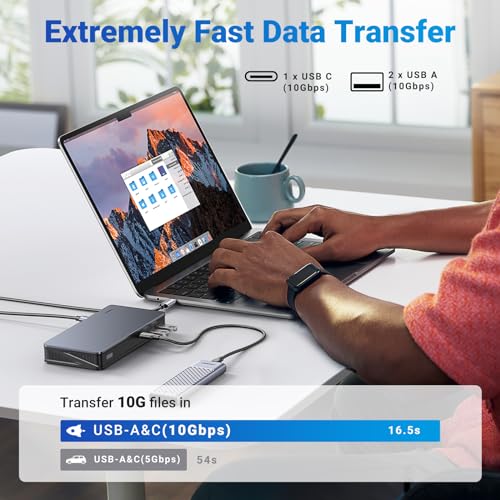
- Transfer files in seconds: With 3x 10Gbps USB data ports (USB-A and USB-C), the USB C Docking Station enables 10GB file transfers in just 16 seconds. Ideal for external SSDs and 8K RAW video workflows.
- 100W PD Charging: Power virtually any USB-C laptop, including the latest MacBooks, with up to 85W via the 100W USB-C Power Delivery port, ensuring uninterrupted productivity.
- 1000Mbps Network: After installing the DisplayLink software, you can connect to the Gigabit Ethernet port via the USB C Dock and enjoy a fast and stable network up to 1Gbps.
- Package List: 1x 9-in-1 Type C Docking Station, 1x USB-C to USB-C cable, 1x User Manual. (Not included: Power Adapter, HDMI Cable)
- Note: The HDMI and DP ports in “Display 1” or “Display 2” cant work together, please choose one port in Display 1 and one port in Display 2 to work together. And only two display are supported at the same time. The left USB-A port has compatibility limitations with some USB 2.0 flash drives. If the drive is not recognized when inserted, please use the right USB-A port instead.
- Note: Make sure the computer is connected to the host port of the docking station using the included USB-C cable, and connect USB-C power port of the dock to the PD charger to ensure sufficient power supply for the dock.
- Note: For macOS Catalina 10.15 and later, the Screen Recording feature must be enabled for the DisplayLink driver to work properly. The DisplayLink driver does not store or record any screen content it only enables screen extension.
What's in the box?
- 1x 9 in 1 USB C Docking Station
Product Description
Previous page Next page 1 Why Choose DisplayLink 2 ABC Mode 3 AAB Mode 4 ABB Mode Previous page Next page 1 Dual 4K@60Hz Displays 2 10Gbps Transfer Speed 3 Gigabit Ethernet Port Note: The HDMI and DP ports in the same "Display" can't work together, please choose "HDMI 1+HDMI 2", "DP 1+DP 2", "HDMI 1+DP 2", or"HDMI 2+DP 1" to use. Why can't my network port and video port work? (1) You need to download and install the DisplayLink driver before use. (2) You need to press the power button to turn on the product, and the LED indicator light will light up. How do I install the DisplayLink driver? After the product is connected, a hard disk containing the driver download path will be generated, so that you can update the driver to the latest version at any time. This will not take up any memory on your PC and has no security risks. How can I set the display mode, display order, and display rotation angle? For macOS, you can check the "MacOS Operation Guide" video of the product page or check the "User Manual" to know how to set. For Windows, you can check the "User Manual" to know how to set. Dose it support dual monitors 144Hz? Yes, the HDMI and DP ports support 4K@60Hz, 2K@120Hz, and 1080P@144Hz at the same time. You can get dual monitors 144Hz at 1080P resolution. If it can't reach, please check the display settings to see if the refresh rate can be increased. Does the docking station come with a power adapter? No, it doesn't come with a power adapter. You can use your original power adapter or purchase a charger separately. High power consumption devices require additional power supply.
Recommended Deals
Loading recommendations...