
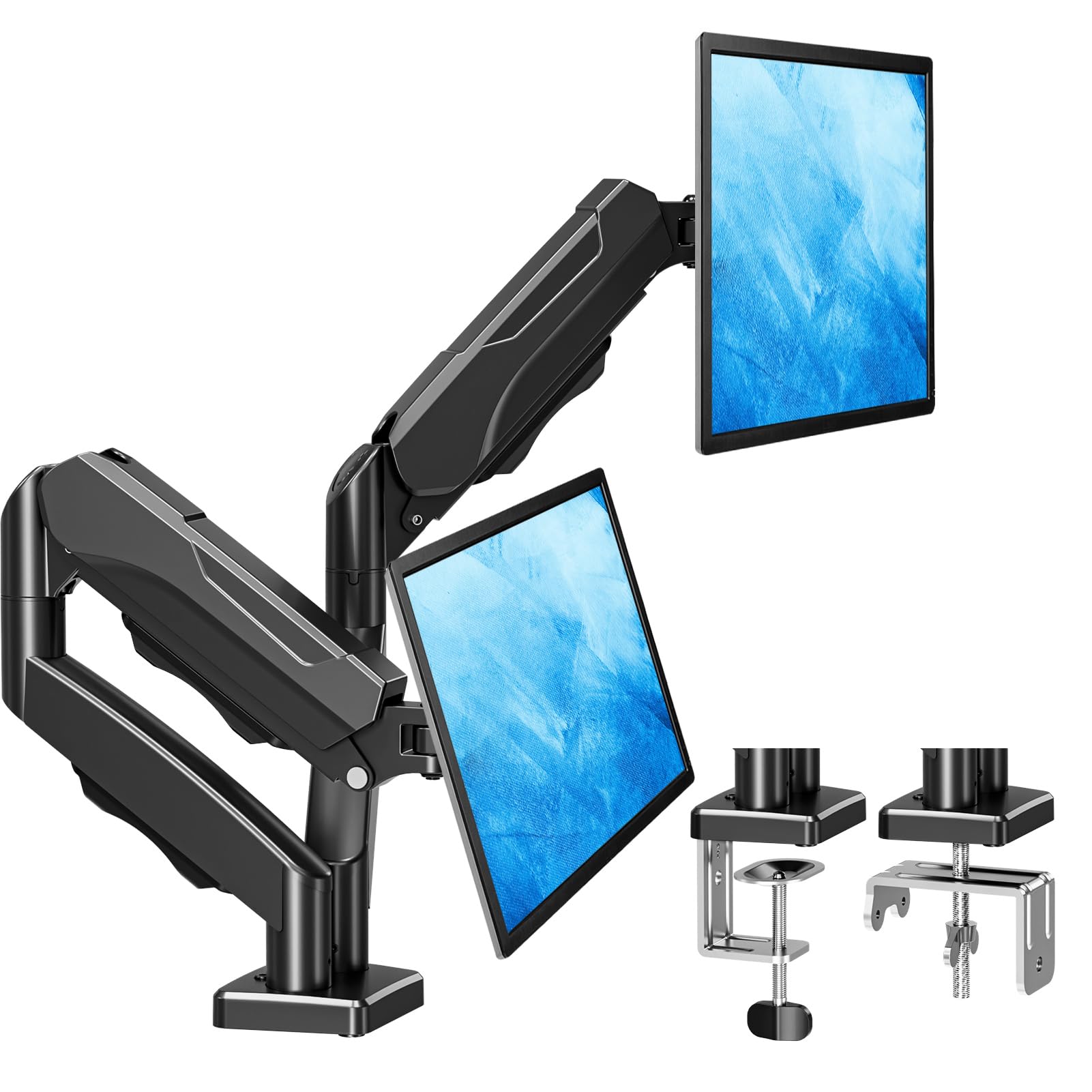
MOUNTUP Dual Monitor Stand for Desk, Gas Spring Monitor Arms for 32 27 24 22 Inches, Height Adjustable Double Monitors Mount, VESA Mount with C-Clamp & Grommet Base, Holds 4.4-19.8lbs
Brand: MOUNTUP
Product Summary: MOUNTUP Dual Monitor Stand for Desk, Gas Spring Monitor Arms for 32 27 24 22 Inches, Height Adjustable Double Monitors Mount, VESA Mount with C-Clamp & Grommet Base, Holds 4.4-19.8lbs is currently listed on Amazon India at a deal price of ₹4,899. This is a genuine discount of 55.46% compared to its list price of ₹10,999.
Current Configuration:
Available Size / Colour:
View on AmazonProduct prices and availability are accurate as of August 15, 2026 07:36 AM IST and are subject to change. Any price and availability information displayed on Amazon.in at the time of purchase will apply to the purchase of this product.
As an Amazon Associate, we earn from qualifying purchases. This helps support our site's server maintenance costs.
Product Details & Specifications
- Primary Product ASIN B07Z7ZM8CJ
- Category Tree Path Computers & Accessories > Accessories & Peripherals > Monitor Accessories > Monitor Arms
- Fulfilled & Sold By MOUNTUP-IN
- Mounting Type Tabletop Mount
- Movement Type Articulating, Rotate, Swivel, Tilt
- Compatible Devices Monitor
- Maximum Tilt Angle 18 Degrees
- Enclosure Material Metal
- Colour Black
- Minimum-Supported Screen Size 13 Inches
- Maximum-Supported Screen Size 32 Inches
- Brand Name MOUNTUP
- Manufacturer Guangzhou Zhuo Li Chuang Xin Ke Ji Youxian Gongsi, mountup-in@hotmail.com
- Manufacturer Part Number MU0005
- Model Number MU0005
- Warranty Description 3 Years
- Item Type Name Monitor Arm
- Packer Contact Information mountup-in@hotmail.com
- Importer Contact Information TIGER PUG COMMERCE PRIVATE LIMITED A-302, DIPTI CLASSIC, 32/34 SUREN ROAD ANDHERI EAST, Mumbai Suburban, MAHARASHTRA, 400093 Telephone: 022-6879 5151 or Email us at consumerservices@tigerpug.com
- Unit Count 1 Set
- Country of Origin China
- Item Weight Unit of Measure 3.86 Kilograms
- Manufacturer Contact Information mountup-in@hotmail.com
- Best Sellers Rank #1,424 in Computers & Accessories (See Top 100 in Computers & Accessories) #7 in Computer Monitor Arms
- ASIN B07Z7ZM8CJ
- Customer Reviews 4.4 4.4 out of 5 stars (6,872) 4.4 out of 5 stars
About this item
- Universal Monitor Desk Mount - The dual monitor mount fits screens 4.4lbs - 17.6 lbs in weight and 13-32 inches diagonal compatible with VESA patterns 75x75 mm and 100x100 mm. Double-monitor users need a break, too. Lets not let the strain be in the neck and back regions of the body. Enjoy the benefits of monitors that float above your desk and see how much space and productivity you can gain.
- Full Motion Monitor Arm - Provides flexible, independent positioning of both monitors in a clean aesthetic to complement any office environment. The dual monitor arm allows you to customize how you work or collaborate with 135° tilt, 180° swivel, and 360°rotation (from portrait to landscape). Each connection of the arm is adjustable. Youll be able to pose your screen where you want it.
- Quick Installation - Easy assembly with the C-clamp or grommet base. The C-clamp fits the desktops 0.39 - 4.53 thick and the grommet mounting fits the desktop 0.39 - 3.15 thick with a bolt-through hole 0.39 - 2.36.
- Premium Gas Spring Arms - Extensive quality testing ensures your computer monitors stay stable and secure. The monitor arm offers full monitor movement with 19.9 of arm extension and 9.4 of height adjustment range. The dual monitor arm with a gas spring system provides smooth and durable adjustments. Please adjust the tension of the gas spring arm properly according to the weight of your monitor.
- Professional Space Saver - The dual monitor mount with cable management, conceals wires within arms and frees up more desk space by holding 2 monitor arms. Getting your monitors off your desktop will provide you with extra room for your favorite desk decor. Just enjoy your working, gaming, or viewing hours in a more comfortable environment.
Product Description
MOUNTUP Dual Monitor Stand - Elevate Your Workspace Two Screens, One Perfect View – Adjustable Dual Monitor Mount for Seamless Multitasking. Previous page Next page 1 Monitor Compatibility 2 Check VESA Pattern 3 Check Desk Thickness 4 Check Desk Type Previous page Next page 1 Full Motion 2 Adjustable Arm 3 Screen Setups 4 Gas Spring Tension And Tilt Adjustment Important Note: The gas spring is pre-set to medium tension(Not applicable to all displays). You will need to refer to the figure above and adjust the tension according to the weight of your monitor once the monitor is hung on. Previous page Next page 1 Improved Efficiency 2 Streamline Your Work Area 3 Easy Installation 4 For Working The VESA plate is oriented crookedly. How to solve it? If the VESA plate is not in the right position, please hold it with both hands and rotate vigorously to make up arows pointing up. You could refer to the third video on the detail page. Please don't worry. This is normal. Why does not the arm stay in the position needed? Please note that when out of the factory, the value of the gas spring is generaly adiusted to the minimum value which makes the arms lean forward. You could refer to the instruction manual to adjust the value according to the weight of your monitor. When the monitor keeps tilting down, how we can solve it? You could adjust the tilting bolt for the monitor. 1. Loosen the bolt 1-2 turns with the Allen Key 2. Hold the monitor with both hands and adjust it to the right position 3. Tighten the bolt firmly with the Allen Key When the tension on the arm does not work at all, how we can do? Please tell us ASAP and we will send you the new spare parts.
Recommended Deals
Loading recommendations...