
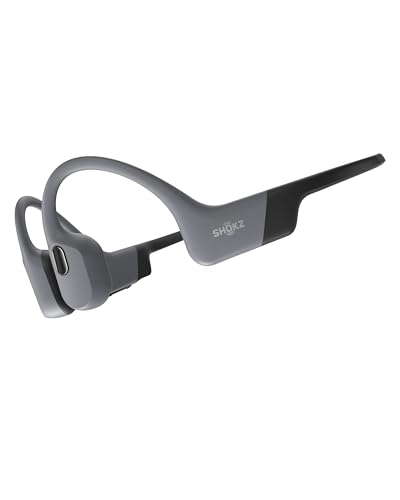


SHOKZ OpenSwim Pro Bone Conduction Sports Headphones, IP68, Grey
Brand: SHOKZ
Product Summary: SHOKZ OpenSwim Pro Bone Conduction Sports Headphones, IP68, Grey is currently listed on Amazon India at a deal price of ₹18,999. This is a genuine discount of 27.2% compared to its list price of ₹26,099.
Current Configuration:
Available Colour:
View on AmazonProduct prices and availability are accurate as of August 23, 2026 09:34 AM IST and are subject to change. Any price and availability information displayed on Amazon.in at the time of purchase will apply to the purchase of this product.
As an Amazon Associate, we earn from qualifying purchases. This helps support our site's server maintenance costs.
Product Details & Specifications
- Primary Product ASIN B0CS3JBP67
- Category Tree Path Electronics > Headphones, Earbuds & Accessories > Headphones > Open-Ear Headphones
- Fulfilled & Sold By Shokz OfficialStore
- Brand Name SHOKZ
- Model Number SHOKZ S710
- Model Name OpenSwim Pro
- Box Contents 4-Pin Magnetic Charging Cable, OpenSwim Pro Headphone, Silicone Rubber Carrying Case & Swimming Earplugs, User Instructions
- Age Range Description Adult
- Country of Origin China
- Warranty Description 2 years warranty
- Customer Package Type Standard Packaging
- Number of Items 1
- Series Number 710
- UPC 810092678618
- Manufacturer SHOKZ (SINGAPORE) PTE. LTD.
- External Testing Certification ANATEL: 06240-24-16608
- Importer Contact Information VALUECART PRIVATE LIMITED, 2nd Floor, 1/1 Vinayaka Towers 1st Cross, Gandhinagar BENGAL, 2nd Floor, 1/1 Vinayaka Towers 1st Cross, BENGALURU, Karnataka, 560009, IN
- Is Autographed No
- Item Type Name Headphone
- Packer Contact Information SHOKZ (SINGAPORE) PTE. LTD., Shiyan Street,Ban'an District, Floors 1-4,Factory Building 26,Shancheng Industrial Park, Shenzhen, Guangdong, 518108, CN
- Best Sellers Rank #5,683 in Electronics (See Top 100 in Electronics) #22 in Open-Ear Headphones
- ASIN B0CS3JBP67
- Customer Reviews 4.2 4.2 out of 5 stars (3,071) 4.2 out of 5 stars
- Headphones Ear Placement Open Ear
- Headphone Form Factor Open Ear
- Earpiece Shape Flat or slightly curved, resting on the ear
- Control Type Call Control/Volume Control/Media Control
- Control Method Touch
- Controller Type Built-in Touch Control
- Battery Charge Time 90 Minutes
- Battery Average Life 9 Hours
- Impedance Unit of Measure 8.5 Ohms
- Noise Control None
- Frequency Response 2402 MHz
- Audio Driver Type Dynamic Driver
- Frequency Range 20Hz - 20,000Hz
- Enclosure Material Silicone, plastic, nickel-titanium alloy
- Specific Uses For Product Business, Entertainment, Swimming
- Antenna Location Work/Running/Swimming/Sports/Commute/Daily-use/Exercise/Entertainment/Meetings/Training
- Compatible Devices Smartphones
- Cable Features Without Cable
- Water Resistance Level Waterproof
- Carrying Case Material Silicone
- Product Features Fast Charging, Lightweight, Microphone Included, Multipoint Pairing, Surround Sound
- Is Electric Yes
- Headphone Jack USB
- Network Connectivity Technology Wireless
- Wireless Technology Type Bluetooth
- Bluetooth Range 10 Metres
- Bluetooth Version 5.4
- Colour Grey
- Style Name Waterproof
- Carrying Case Color Grey
- Theme Work/Running/Sports/Commute/Daily-use/Exercise/Entertainment/Meetings/Training
- Item Weight Unit of Measure 27.3 Grams
- Unit Count 1 Case
- Carrying Case Battery Charging Time 90 Minutes
About this item
- IP68 Waterproof Rating: OpenSwim Pros IP68 Waterproof Rating lets you go from water activities to rugged terrain. Confidently engage in depths of up to 2 meters for 2 hours, thanks to its enhanced durability.
- Open-ear design, for comfort and safety: Boost your workouts with enhanced safety thanks to our signature open-ear design. Easily perceive potential dangers outdoors, whether youre walking or swimming.
- Bluetooth and MP3 dual modes: OpenSwim Pro brings you the best of both worlds with dual functionality: Bluetooth 5.4 and 32GB MP3 storage seamlessly packaged into one device. Switch effortlessly between the two with intuitive buttons or via the easy-to-use Shokz app.
- Sports Optimized Physical Buttons: OpenSwim Pros physical buttons are designed for optimal sports use and provide instant feedback. Keep navigating music effortlessly and making calls with simple key combinations
- Vivid sound: Enjoy clear sound, powerful volume and colorful bass with PremiumPitch 2.0+ bone conduction technology. Seamlessly switch between sound modes for playing music, calling and swimming, ensuring great audio wherever you are.
- Talk without background noise: Dual noise reduction technologies, ENC and DNS, intelligently adapt to your environment, identify specific audio characteristics, and exclude ambient sounds and echoes. Experience crystal clear conversations that feel like youre talking to in person.
What's in the box?
- OpenSwim Pro Headphone | 4-Pin Magnetic Charging Cable | Silicone Rubber Carrying Case & Swimming Earplugs | User Instructions
Product Description
The video showcases the product in use.The video guides you through product setup.The video compares multiple products.The video shows the product being unpacked. aplus content video Previous page Next page 1 IP68 Waterproof 2 Bluetooth+MP3 Dual Modes 3 Open-Ear Design 4 Secure Fit 5 Comfort Beyond Boundaries Previous page Next page 1 Physical Buttons 2 Flexible Ear Hook 3 Premium Sound Quality 4 Smart Mic 5 9H Playtime&Quick Charge Customize Your Experience with the Shokz App Personalize your OpenSwim Pro experience with the Shokz App. Enjoy control functions like Bluetooth V5.4 and MP3 switching, Multipoint Pairing, EQ mode management, access to real-time battery information, and receive firmware updates. Multipoint Pairing Pair OpenSwim Pro with 2 Bluetooth devices simultaneously Pair OpenSwim Pro with 2 Bluetooth devices simultaneously including smartwatches, smartphones, tablets, and more. Switch effortlessly via the Shokz App or button controls for versatile listening. Discover the OpenSwim Pro Instructions The headphone has 3 buttons: The power/volume up button (+), the volume down button (-), and the multifunction button. The video showcases the product in use.The video guides you through product setup.The video compares multiple products.The video shows the product being unpacked. aplus content video What’s in the Box OpenSwim Pro Headphone 4-Pin Magnetic Charging Cable Swimming Earplugs Swimming Nose Clip & Silicone Rubber Carrying Case & User Instructions OpenSwim Pro Which is the Best for You PremiumPitch 2.0+ Technology Shokz TurboPitch IP68 Water Resistance IP55 5.4 Bluetooth 5.1 Noise-Cancelling Mic 32GB Storage of MP3 Mode / Bluetooth 9h/MP3 6h Battery Life 10h Qiuck Charge PremiumPitch 2.0+ Technology PremiumPitch 2.0+ IP68 Water Resistance IP67 5.4 Bluetooth 5.1 Noise-Cancelling Mic 32GB Storage of MP3 Mode / Bluetooth 9h/MP3 6h Battery Life 8h Qiuck Charge PremiumPitch 2.0+ Technology PremiumPitch 2.0 IP68 Water Resistance IP55 5.4 Bluetooth 5.1 Noise-Cancelling Mic 32GB Storage of MP3 Mode / Bluetooth 9h/MP3 6h Battery Life 6h Qiuck Charge Previous page OpenRun Pro Learn More OpenRun Learn More OpenMove Learn More Next page Can I use Bluetooth mode while swimming? It is forbidden to use Bluetooth mode while swimming or underwater, as this will cause a disconnection of Bluetooth in the water. OpenSwim Pro have built-in storage, so it is recommended that you switch to MP3 mode when swimming. What are the track formats that OpenSwim Pro supports? OpenSwim Pro supports audio formats including MP3, FLAC, WAV, AAC, M4A, APE, WMA, and etc. How long will it take to transfer music to OpenSwim Pro? Transfer up to 225 songs in just 1 minute with OpenSwim Pro.The upload speed is approximately 15M/s, quantity calculated based on regular-quality songs at 4MB each.In actual use, the upload speed depends on varied factors and conditions. How to switch between Bluetooth and MP3 mode? Press and hold the volume up (+) button and the volume down (–) button simultaneously until your hear "Bluetooth Mode/MP3 Mode". Release the buttons to switch to the mode you want. How to switch the MP3 playback mode? Press and hold the multi-function button and the volume up (+) button at the same time in MP3 Mode, until you hear "Normal/Shuffle/Repeat". Release the buttons to switch to the playback mode you want.
Recommended Deals
Loading recommendations...